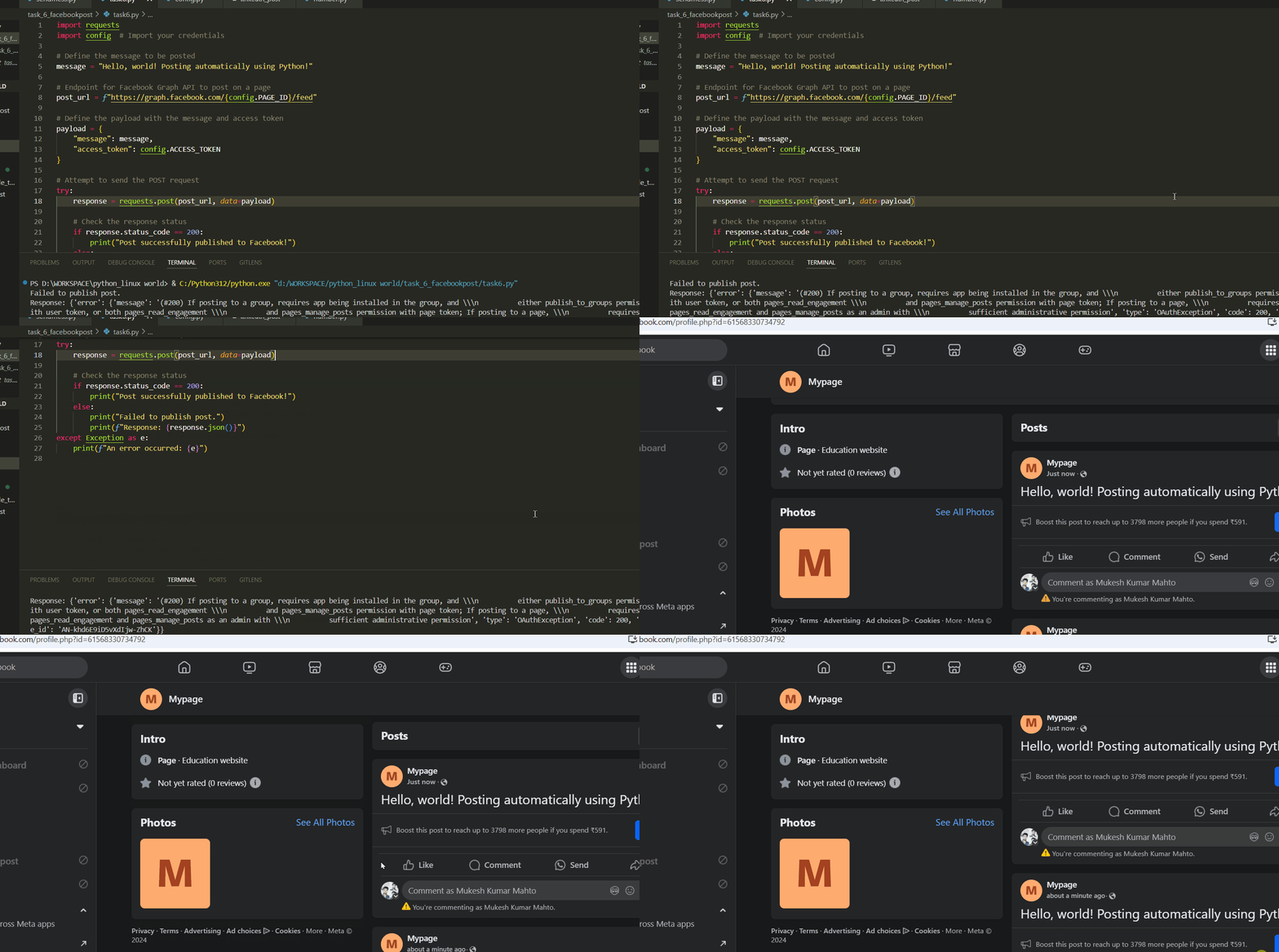
send Facebook post by python
To automatically post to a Facebook page using Python, you must use Facebook's Graph API and a properly configured app with the necessary permissions. Below is a detailed summary of the process, including the Python code, an explanation of the necessary permissions, and error handling tips.
Key Steps to Post on Facebook using Python
1. Set Up Facebook Developer Account and App
Create a Facebook Developer account if you don’t have one already.
Create an app in the Facebook Developer Console, which will provide you with an App ID and App Secret.
2. Configure Permissions
In App Review on the Developer Console, request
pages_read_engagementandpages_manage_postspermissions.Generate a User Access Token with the required permissions using Graph API Explorer. The user accessing this token must have admin rights to the page you want to post on.
3. Set Up the Configuration File (config.py)
- Store your
PAGE_IDandACCESS_TOKENin a configuration file,config.py, to keep sensitive data separate from your main code.
4. Python Code to Post on Facebook
- Use the
requestslibrary in Python to send a POST request with the access token, page ID, and message data to Facebook’s Graph API.
Example Code: Posting to Facebook Page with Python
import requests
import config  # Import your credentials

# Define the message to be posted
message = "Hello, world! Posting automatically using Python!"

# Endpoint for Facebook Graph API to post on a page
post_url = f"https://graph.facebook.com/{config.PAGE_ID}/feed"

# Define the payload with the message and access token
payload = {
    "message": message,
    "access_token": config.ACCESS_TOKEN
}

# Attempt to send the POST request
try:
    response = requests.post(post_url, data=payload)

    # Check the response status
    if response.status_code == 200:
        print("Post successfully published to Facebook!")
    else:
        print("Failed to publish post.")
        print(f"Response: {response.json()}")
except Exception as e:
    print(f"An error occurred: {e}")
Explanation of the Code
Imports:
requests: Used to make HTTP requests to the Graph API.config: A file storingACCESS_TOKENandPAGE_IDsecurely.
post_to_facebook()Function:URL: Constructed to target the Facebook page’s feed.
Payload: Contains
message(the post content) andaccess_token(for authentication).POST Request: Sent to the Graph API. A successful status code (200) confirms the post.
Error Handling:
- If the response status isn’t 200, the code prints the JSON response for troubleshooting. Facebook may require additional permissions, or the token may have expired.
Troubleshooting Common Issues
Error 200 OAuthException: Indicates missing permissions. Double-check that
pages_read_engagementandpages_manage_postspermissions are granted, and that the user has admin rights on the page.Token Expiry: Tokens generated via Graph API Explorer expire quickly. You may need a long-lived token (valid for 60 days) or generate tokens via OAuth if posting regularly.
Permission Approval: If using the app for production, permissions like
pages_read_engagementandpages_manage_postsrequire approval from Facebook.
Using config.py
Store sensitive data like this in config.py:
# config.py
ACCESS_TOKEN = "YOUR_ACCESS_TOKEN"  # Replace with your Facebook access token
PAGE_ID = "YOUR_PAGE_ID"            # Replace with your Facebook page ID
This approach helps automate Facebook posts securely by following best practices with API authentication and permissions.